
MC_ProYT
Trusted Member
Really wish this was in tutorials and guides..
Basically, if u wanna kno how to make custom and cheat-like things on forums like these:

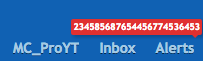
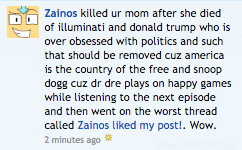 Well, u came to the right place! In this small guide, I'm going to teach you how to make the custom (and awesome) things on forums!
NOTE: This only works on a computer, for it does NOT work on a mobile device!
I hope this tutorial helped!
Thanks! -Pro
Basically, if u wanna kno how to make custom and cheat-like things on forums like these:
NOTE: This only works on a computer, for it does NOT work on a mobile device!
Step 1: Hover over the thing you want to edit, right click, and press inspect or if on Windows, inspect element.
Step 2: A new page on the side of the window will show up. Hover over each line until the thing you want to edit is highlighted. Once highlighted, press edit HTML.
Step 3: Find where it says the thing you wanted to edit, such as 1 (if ur doing 1 new alert), liked your post (in an alert description), etc.
Step 4: Change what you want to edit it to, click on your window/webpage, and close out of the side-window.
Step 5: Take a screenshot and troll your friends xD
Step 2: A new page on the side of the window will show up. Hover over each line until the thing you want to edit is highlighted. Once highlighted, press edit HTML.
Step 3: Find where it says the thing you wanted to edit, such as 1 (if ur doing 1 new alert), liked your post (in an alert description), etc.
Step 4: Change what you want to edit it to, click on your window/webpage, and close out of the side-window.
Step 5: Take a screenshot and troll your friends xD
Thanks! -Pro